
File your GST return (F5) yourself
Generate F5 workpapers from posted ledger data, clear exceptions, validate the filing draft, submit through myTax Portal or the connected IRAS API, and pay by GIRO.
Who can do this
Finance operator prepares; Organization Admin approves
Primary route
/finance/gst
Last verified
5 August 2026
- GST-registered entity with the registration date recorded in Finance settings
- All transactions for the period posted with GST tax codes
- Corppass access to myTax Portal (GST) for the submitter
01
Understand how the F5 derives from your ledger
Every posted line carries a GST tax code, and each code maps to fixed F5 boxes: standard-rated supplies (SR, 9%) to boxes 1 and 6, zero-rated (ZR) to box 2, exempt (ES) to box 3, taxable purchases (TX) to boxes 5 and 7, blocked input tax (BL) to box 5 with no claim, and reverse-charge imported services (RC) to box 14. The F5 is therefore an output of bookkeeping discipline, not a separate data-entry exercise.
- The current standard rate is 9%, in force since 1 January 2024.
- Blocked input tax (private car expenses, club subscriptions, certain staff benefits) appears in purchase values but is never claimed — the BL code handles this automatically.
02
Generate and review the F5 workpapers
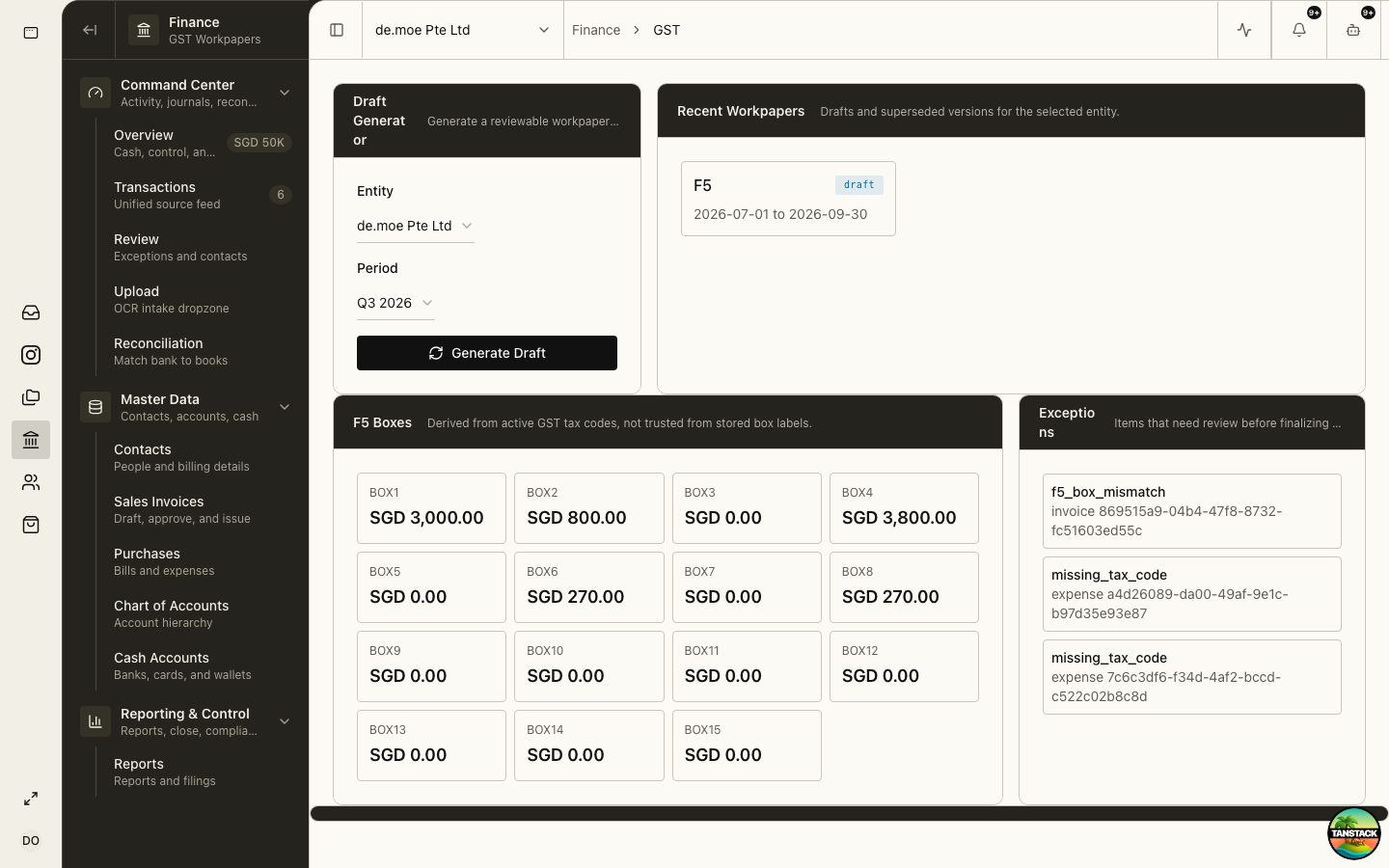
Finance → GST holds the draft generator, derived F5 boxes, persisted source lines, and review exceptions for each filing period.
- Select the GST entity and filing period, then generate the draft workpaper.
- Review the F5 Boxes panel against your expectation of the quarter — a box that surprises you is a coding problem upstream.
- Open Exceptions and resolve every flagged line: missing tax codes, out-of-period documents, and unusual code/account combinations.
- Drill into Persisted Lines to trace any box total back to its source documents.
- Regenerate after corrections; the workpaper versions rather than silently mutating.
Expected result: A workpaper with no open exceptions whose box totals you can explain line by line.
03
Validate the filing and submit
Finance → Reports → Filings tracks each statutory obligation through prepare, validate, and submission states.
- Open Finance → Reports → Filings, find the GST F5 row for the period, and select Prepare.
- Resolve any blockers shown on the row (missing filing facts, open workpaper exceptions).
- When the row reads validated, either Request submission through the connected IRAS API (routed through the approval queue) or file manually: sign in to myTax Portal with Corppass and transcribe the box values exactly.
- For manual filing, record the filing as manually filed and attach the myTax Portal acknowledgement.
- Pay by the due date — with GIRO, the deduction is typically around the 15th of the month after the return deadline; without GIRO, pay immediately on filing.
The return is due within one month after the end of the accounting period, even for nil returns. A generated workpaper is not a filed return — only the IRAS acknowledgement is.
04
Correct past returns the official way
Errors discovered after filing are corrected through F7, not by adjusting the next F5 arbitrarily.
- Quantify the error against the original workpaper version — the version history is your audit trail.
- Small errors within IRAS’s administrative concession (net GST error within the published caps) may be adjusted in the next F5; anything larger requires an F7 for the affected period.
- File F8 as the final return when deregistering.
- Keep the correction workpaper and IRAS correspondence attached to the filing record.
Troubleshooting
- Box totals look wrong: check for miscoded lines first — the Persisted Lines view traces every box to source documents.
- The Filings row shows “Needs filing facts”: complete the GST registration date and filing frequency in Finance settings.
- Prepare is blocked: open workpaper exceptions must be cleared; the queue will not build a filing draft over unresolved exceptions.
- InvoiceNow: newly registering companies should verify current GST InvoiceNow transmission requirements with IRAS — applicability is phasing in by registration date.